Tuesday, March 19, 2013

Top 20 Biggest Websites In The World

Google is not the biggest website in the world.

It’s No. 2.

Do you know who’s No. 1?

Hint: It’s another American company.

By the way, guess how many of the top 20 websites in the world are Chinese.

1? 5? 10?

Thanks to ComScore, which provided us data on the top most popular Web domains in the world.


biggest websites in the world : ehack

20. Amazon.com – 163 Million Unique Visitors

Amazon.com – 163 Million Unique Visitors : ehack
What it is: The ultimate online shopping destination for electronics, apparel, sporting goods, and even food.
How it got so big: When Amazon first launched, it was nothing more than a few people packing and shipping boxes of books. But it has since grown to shipping everything from trumpets to the Kindle Fire.

19. Sina.com.cn – 169 Million Unique Visitors

Sina.com.cn - 169 Million Unique Visitors : ehack
Sina.com.cn – 169 Million Unique Visitors : ehack
What it is: Chinese mobile portal for media and user-generated content.
How it got so big: In the early 2000s, Sina was known as the “Yahoo of China.” Sina launched microblogging service Weibo in 2009, and has grown to more than 400 million users.

18. WordPress.com – 170.9 Million Unique Visitors

WordPress.com - 170.9 Million Unique Visitors : ehack
WordPress.com – 170.9 Million Unique Visitors : ehack
What it is: Blogging platform.
How it got so big: WordPress has been able to attract users by offering dead-simple tools for blogging and web publishing. Given that it’s open source, WordPress has the upper hand on other platforms that require licensing fees. Back in 2004, when Movable Type changed its license, a lot of people left for WordPress.

17. Apple.com – 171.7 Million Unique Visitors

Apple.com - 171.7 Million Unique Visitors : ehack
Apple.com – 171.7 Million Unique Visitors : ehack
What it is: Online destination for Apple products and software.
How it got so big: Apple.com is the domain for the Apple Store as well as customer support pages for all Apple products. It’s bookmarked as the default homepage on Safari browsers, which are the default browsers in all Apple Internet-connected products – of which there are hundreds of millions.

16. Sohu.com – 175.8 Million Unique Visitors

Sohu.com - 175.8 Million Unique Visitors : ehack
Sohu.com – 175.8 Million Unique Visitors : ehack
What it is: Chinese portal and search engine.
How it got so big: Sohu started in 1997 as the country’s first online search company. It has since grown to become a massive portal that points to other properties like its games portal and real estate website.

15. Bing.com – 184 Million Unique Visitors

Bing.com - 184 Million Unique Visitors : ehack
Bing.com – 184 Million Unique Visitors : ehack
What it is: Web search engine.
How it got so big: Microsoft has aggressively advertised Bing, and made huge efforts to make the search engine much easier to use, with the addition of things like the social sidebar and improved algorithms. Microsoft also pays other Websites to link to Bing.

14. Twitter.com – 189.8 Million Unique Visitors

Twitter.com - 189.8 Million Unique Visitors : ehack
Twitter.com – 189.8 Million Unique Visitors : ehack
What it is: Real-time communications platform.
How it got so big: Since launching in 2009, Twitter has become a go-to site for staying up to date with what’s happening all over the world. The presence of news organizations, politicians, and other industry-specific experts have turned Twitter into the ultimate source of information.

13. Taobao.com – 207 Million Unique Visitors

taobaocom-207-million-unique-visitors : ehack
taobao.com-207-million-unique-visitors : ehack
What it is: Chinese marketplace for clothing, accessories, jewelry, food, electronics, and more.
How it got so big: Similar to eBay and Amazon, Taobao is one of the largest online marketplaces in the world. In 2003, Alibaba, the company that owns Taoboa, launched it to the public without any fees required to create a listing on the site, which helped transform the giant into a huge shopping search engine.

12. Ask.com – 218.4 Million Unique Visitors

ask.com-2184-million-unique-visitors : ehack
What it is: A Google-powered search engine.
How it got so big: Ask.com started as AskJeeves back in the 1990s. When its parent company, IAC, acquired About.com, Ask was able to add much more content to its site. It’s now basically a re-branded version of Google search.

11. Blogger.com – 229.9 Million Unique Visitors

blogger.com-2299-million-unique-visitors : ehack
What it is: Blogging platform.
How it got so big: Blogger started off as a very tiny company in San Francisco. It struggled during the dotcom bust, but Google helped save the company when it acquired it in 2002.

10. MSN.com – 254.1 Million Unique Visitors

msn.com-2541-million-unique-visitors : ehack
What it is: A collection of Microsoft-owned Internet properties.
How it got so big: MSN has grown from an ISP to an online destination with web-based services like Hotmail and MSN Messenger. It’s a portal.

9. Baidu – 268.7 Million Unique Visitors

baidu-2687-million-unique-visitors : ehack
What it is: Chinese search engine for websites, audio, and images.
How it got so big: Baidu is one of China’s most popular search engines. It employs thousands of China’s best engineers to continually update the quality and speed of its search engine.

8. Microsoft.com – 271.7 Million Unique Visitors

microsoft.com-2717-million-unique-visitors : ehack
What it is: Destination for purchasing Microsoft products, and downloading MS software and updates.
How it got so big: There are a lot of Microsoft Windows-powered computers out there, and most of them come with Microsoft.com bookmarked for customer support and lots of other functions.

7. QQ.com – 284.1 Million Unique Visitors

qq.com-2841-million-unique-visitors : ehack
What it is: China-based search engine and portal.
How it got so big: The company behind QQ.com, Tencent, has created China’s most dominant instant messaging service. The IM client boasts more than 700 million active users, which has fueled growth in the company’s other products including Qzone and the Tencent Weibo blog.

6. Live.com – 389.5 Million Unique Visitors

live.com-3895-million-unique-visitors : ehack
What it is: Microsoft’s new email service.
How it got so big: Microsoft made both of its email services, Outlook and Hotmail, accessible through Live.com. If you go to Hotmail.com, you are redirected to Live.com. Same for Outlook.com.

5. Wikipedia.org – 469.6 Million Unique Visitors

wikipedia.org-4696-million-unique-visitors : ehack
What it is: A free, web-based encyclopedia platform.
How it got so big: Wikipedia lets anyone post and edit content on the site, making it a great resource for educational content. Like Answers.com et al, most of its traffic comes from Google because it answers the questions people ask Google.

4. Yahoo.com – 469.9 Million Unique Visitors

yahoo.com-4699-million-unique-visitors : ehack
What it is: Search engine and platform that connects to users to other Yahoo properties, such as Yahoo Finance and Flickr.
How it got so big: Yahoo is one of the original Web portals from the 1990s. People go there for news, sports, finance, and email.

3. YouTube.com – 721.9 Million Unique Visitors

youtube.com-7219-million-unique-visitors : ehack
What it is: Platform for uploading, sharing, and watching user-created videos.
How it got so big: Google’s purchase of YouTube in 2006 definitely gave the site more street cred. Since then, people have been hooked on watching cat videos and using the site to discover new artists like Justin Bieber, for example.

2. Google.com – 782.8 Million Unique Visitors

google.com-7828-million-unique-visitors : ehack
What it is: Web search engine.
How it got so big: Google entered a crowded search engine market in the late 1990s, but won because it was the fastest and had a clean design. Now it powers all kinds of products, like Gmail, Google Maps, and Google+. It’s the way people navigate the Internet.

1. Facebook.com – 836.7 Million Unique Visitors

facebook.com-8367-million-unique-visitors : ehack
What it is: Social network to keep in touch with your friends.
How it got so big: Facebook CEO Mark Zuckerberg started Facebook when he was a sophomore at Harvard. The site was initially only open to Harvard students, but later expanded to include other universities, high school students, and eventually, anyone over the age of 13.

comment if you liked the post.You do not need to register.

Monday, March 18, 2013

Learn html step by step part 1

I am going to teach you guys Hyper Text Markup Language (HTML) everyday.So stay tuned

Let us start with a webpage.

What is a web page ?
Web pages are very different from, say, a Word document.  In a word processor document all aspects of the page are incorporated into the one file ... the graphics, font styles and sizes and other formatting. A web page is basically plain (ASCII) text with 'tags' (as ASCII text) incorporated.  The graphics are all separate files.  Your web browser reads the ASCII text with the tags and graphic files and displays the complete formatted page. Because web pages are only ASCII text they can be prepared in any text editor.  However,there are advantages to preparing a web page using a special web page or HTML editor, as will become obvious as we progress through the course.

What is HTML?

HTML is code written in the form of HTML elements consisting of tags enclosed in angle brackets (like <html>), within the web page content. HTML tags most commonly come in pairs like <h1> and </h1>, although some tags, known as empty elements, are unpaired, for example <img>. The first tag in a pair is the start tag, the second tag is the end tag (they are also called opening tags and closing tags). In between these tags web designers can add text, tags, comments and other types of text-based content.

So, what is a Tag ?
Tags are 'codes' included in the web page file that tell the Browser what type of formatting to apply to any text placed in between pairs of Tags.  For example, if you want a word to be displayed in bold you use a tag to turn on the bold formatting function of a Browser - and the tag is


         <a>


Any text that appears after that tag will be displayed in bold.To revert to normal text you have to turn off the bold function, thus

         </a>


The complete  code then would be
         <a>text</a>              and this would be displayed ...            text


Note that tags are not case sensitive and that nearly all tags are in pairs.

I am too tired today.I am going to end this here today.Do comment.You need not register to do so.

Sunday, March 17, 2013

5 Android apps for you


Google Earth


Explore the world from the palm of your hand with Google Earth.
Fly around the planet with a swipe of your finger with Google Earth for Android. Explore distant lands or reacquaint yourself with your childhood home. Search by voice for cities, places, and businesses. Browse layers including roads, borders, places, photos and more. Visit the Earth Gallery to find exciting maps such as real-time earthquakes, planes in flight, hiking trails, city tours, and more.Use the new “tour guide” to easily discover exciting new places to explore. With a quick swipe on the tab at the bottom of the screen, you can bring up a selection of virtual tours from around the globe.
 

CJ: Strike Back


Aliens are invading, time to strike back! Fast paced, and super challenging!
Aliens are invading, the city is in danger - It's time for human to strike back, to defeat aliens invasion! Jump to fight against mechanized troops, kill the boss of aliens, and achieve all tasks to save the city!
# Tap screen to jump to kill enemies. 
# Kill 3 of the same kind enemies to POWER UP.
# Kill the boss for extra bonus.
# Achieve appointed tasks to get higher score.


Nimbuzz Messenger


Nimbuzz Messenger is a free chat & calling app to connect with your buddies 24x7
Nimbuzz Messenger combines the power of internet and smart phone messenger into one, and lets you make free voice calls, send unlimited chat messages, share files on any mobile device across popular messengers. Nimbuzz Messenger is available on Android, iOS, Blackberry, Symbian, Java, Windows PC and Mac.
Nimbuzz Messenger lets you chat with your buddies on Facebook, Gtalk Messenger, Yahoo Messenger, Live Messenger (MSN) 24x7 for free.Connect your address book and share unlimited photos, files, music and videos with other friends of yours on Facebook, Yahoo Messenger, Gtalk Messenger and Live Messenger (MSN). You can also connect with your friends on Twitter using our popular chat buddy.Below is the list of Nimbuzz Messenger’s amazing features that take your mobile IM experience to the next level:

• FREE HD VOICE CALLS – HD quality voice calls for free with all your Nimbuzz Messenger contacts 
• FREE MESSAGING - Replace SMS with unlimited free chat
• IM COMMUNITY - Connect with multiple IM accounts and have them in one list (Facebook, Yahoo Messenger, MSN/Live Messenger, Gtalk)
• FREE PUSH NOTIFICATIONS: Appear always online and be available to chat with Push Notifications for incoming messages. 
• OFFLINE MESSAGES: Even if you miss your push notifications or turn off your phone, Nimbuzz saves your messages offline until you retrieve them during the next application use
• CHEAP INTERNATIONAL CALLS – Buy Nimbuzz Out credits and make really cheap international calls to mobile and landline
• SIP VOIP ACCOUNTS – Connect to any of our existing SIP partners or to any other SIP provider and enjoy extremely low cost calls 
• CHAT BUDDIES – Use our popular chat buddies for Twitter, Cricket, Astrology etc.
• AND MUCH MORE: Custom chat wallpaper, Landscape mode, Contact sorting, improved Presence Icons, precise message time stamps, Chat history, N-world, free Avatars and much more.
     

SIM Contacts


Good app for sim contacts.This application enables you to manage your sim contacts.

REQUIRES ANDROID : 1.6 and up  SIZE : 106 KB

Features :
* Load sim contacts
* Add new contact
* Modidy contact
* Delete contact
* Call
* Send message
* Copy to phone
* Batch operation
* Support incoming calls to remind
* Searching by name
If you have any questions or you want to help SIM Contacts to add support for your language , please email support@needom.com.

Zombie City2 (Boss)

Over 2,000,000 of downloads for Zombie City.
1 Million people addicted to Zombie City can't be wrong.

★ Story:
Only you are the one survivor in the city that all died.
You have to survive from zombie who are trying to attack you, use your weapons and pops to kill the zombies.

What's new in Zombie City II:
- Support Tablets and More resolution
- Zombie Boss!
- Kill enemies to POWER UP!
- New Weapons
                                                                          
You do not need to register to comment in my blog.so please comment.Do not be a sluggard like me.Thank you


Wednesday, March 13, 2013

Self Assessment Test by Brain Works !! Try it now

Today I'm gonna talk about something different. It can be compared to a psychological test. If you take this test you will be able to know which part of your brain works more than other parts. How you respond to new situations or experiences. 

This test will also help you to realize what will be the effective learning system for yourself. It will show you how you use the parts of your brain and by what percentage. 

This self assessment test is prepared by Synergistic Incorporation Ltd. 
  1. Download the zipped file from the link below and unzip it. 
  2. Click twice on Brain.exe file.
  3. Now you will see the Welcome Screen. Click anywhere or press any key to continue.
  4. Enter Your Name and press Enter.
  5. Read the Introduction message if you want or press any key to continue.
  6. Another message may appear. Read this or skip. Reading will increase your understanding of this software. 
  7. Now you've to answer 20 questions. Answer all the questions. You can use mouse or press A, B or C to answer a question. (Remember: There is no right or wrong answer)
  8. When you finish you will see an image of your brain usage. Focus on your percentage of Auditory, Visual, Left and Right brain usage. 
  9. Then hit on Personal Evaluation and read the full report about your brain. That's it. 

Note: When you run this application on your PC you can't close it, or go to the desktop. To close this program press Alt + F4. And simply press Start + D to go to the Desktop
                                                           Download brain works

Download Free Mobile Dictionaries for Java Mobiles!

Mobile phone users often ask for free mobile dictionary. And there are many sites for downloading mobile dictionary. Specially there are lots of options for Java enabled cell phones. Because Java is a popular file format for mobile apps and also very handy to install and use. 

Today I'm gonna share a site with you. And here you will get free mobile dictionaries for your java enabled mobile phone. 

Features: 
  • Support Online/ Offline Installation
  • Fast, Easy and Safe
  • Instant Translation
  • On Screen Keyboard for Touch Screen
  • Small File Size
  • Adjustable Font Size

Supported Mobiles:
  • Nokia
  • Samsung
  • Motorola
  • LG
  • SE
  • RIM Phones
  • Other Java Enabled Sets

Instruction: No special procedure is required for downloading or installing the dictionary. This is very simple. 
  1. First go to this site: Dictionary 9
  2. Select your flag or first language. ie. English
  3. Now choose your second language. ie. Bengali. (That means your dictionary will be English to Bengali) 
  4. Hit on the Download button.
  5. Immediately a box will appear. At the left side you get a link. On the right, you will get a download option. 
  6. Visit the link of the left side from your phone if you wanna install this immediately. Or you can download it from the right side link to keep a backup file on your PC. 

Installation Procedure: 

If you keep the file in your PC then you've to transfer the file to the phone memory. Then open your File Manager from mobile. You will be able to see Java File. Then select the file and hit OK to start installation. That's it. Enjoy surfing the word!

Monday, March 11, 2013

How to Split Zip Files with winzip

Zip files provide great way to compress our files. This not only protects our loose files inside the archive but also reduces the disk space used by the files otherwise.
But what most people doesn’t know is that we can use the WinZip tool to split the zip files as well. WinZip is a third party tool to compress and zip the files into one archive.
WinZip also has a support for splitting zipped files into smaller files of desired size. This feature is very useful as an alternative to disk spanning because:
  • To overcome e-mail size limits. Some e-mail systems limit the size of attachments; if you want to e-mail a large Zip file that exceeds your limit, you can split it into smaller parts and e-mail them separately.
  • As an alternative to spanned Zip files when you want to make multiple copies of the disk set.
  • To assist with large downloads. Some users may have difficulty downloading very large Zip files from web sites, FTP sites, etc. You can use the split Zip feature to break large files into smaller pieces that can be downloaded separately.
Download WinZip

Instantly download your rapidshare files

We like downloading stuffs from various file sharing websites like Rapidshare, Megaupload, 4shared etc but the thing is we need to wait some time to be able to download files from them if we are free users. There may be many tools or tips available to bypass the time limit but the latest one that I heard about lately is called Mipony.
Mipony is a program to facilitate the download of files from free host sites such as Rapidshare, Megaupload, Easy-share, MediaFire and Filefactory etc. Mipony is a Windows download manager which automatically downloads the file in the order you indicate it to do so and by copying and pasting the links. When you download files from host sites, you usually find that there are restrictions that make you stay tuned to download. Mipony manages all these restrictions and controls the validation keys, the waiting times, the server selection, the daily download limit, etc.
The tool has an in-built web browser as well so that you don’t need to launch a separate one when searching the links. Put the addresses of the files in Mipony and the program will be in charge of everything to have the files downloaded as fast as possible. Mipony also checks every link to see if the file has been deleted from the server or if it is available to be downloaded.
Once the link has been added to the download list, the files will be downloaded while you navigate and if you close the download program, the downloads will be restarted when you start the program again. Mipony also has the option to join the files together (HJ Split files).
The tool is definitely worth a try.
Download Mipony

My most favourite converter format factory

Format factory 3.0.0(All Multimedia Files converter)

مضخم الصوت الشهير " Audio
Program Format factory Freeware to convert between all suffixes for multimedia files (audio files, video files, and image files). has the ability to convert between all formats, in addition to: conversion of mobile phone devices, devices PSP, and mobile iPone . transfer DVD movies to video files. took a picture of DVDs and CD format ISO / CSO. conversion from ISO to CSO Notes when switchingbetween suffixes audio files, you can specify the attributes you want in terms of quality,
مضخم الصوت الشهير " Audio
such as Bitrate and Sample Rate. whenswitching between all suffixes (audio, image, and video), you can choose to use "turn off the machine after the completion of the conversion." This property is particularly important when converting video files which usually takes converted a long time. Or when converting a set of audio files at once ... the program proves Arabic directly automatically, that the program does not work in Arabic for the selection of Arabic Language >> Arabic Format Factory is a multifunctional media converter. Provides functions below:All to MP4/3GP/MPG / AVI / WMV / FLV / SWF. All to MP3/WMA/AMR/OGG/AAC/WAV. All to JPG / BMP / PNG / TIF / ICO / GIF / TGA. Rip DVD to video file, Rip Music CD to audio file . MP4 files support iPod / iPhone / PSP / BlackBerry format. Supports RMVB, Watermark, AV Mux.


Format Factory is a multifunctional media converter.


Provides functions below:


All to MP4/3GP/MPG/AVI/WMV/FLV/SWF.


All to MP3/WMA/AMR/OGG/AAC/WAV.
All to JPG/BMP/PNG/TIF/ICO/GIF/TGA.
Rip DVD to video file , Rip Music CD to audio file.
MP4 files support iPod/iPhone/PSP/BlackBerry format.
Supports RMVB,Watermark, AV Mux.
Format Factory's Feature:
1 support converting all popular video,audio,picture formats to others.
2 Repair damaged video and audio file.
3 Reducing Multimedia file size.
4 Support iphone,ipod multimedia file formats.
5 Picture converting supports Zoom,Rotate/Flip,tags.
6 DVD Ripper.
7 Supports 62 languages
OS requirements: All Windows OS

Gaming style calculator

We are not going to say that gamers are people who cannot switch off from playing the game. however, why would there be a calculator designed in the shape of games controller, if they were not completely living the gamers life! well this fully functional calculator can help the player get over not being able to spend more time on the Xbox 360!
These are the features and details for the cool gamer style calculator;
Everyone is familiar with the game pad layout, which makes our Cool Gamer Calculator so much fun and easy to use. It features a fantastic cool new take on the standard calculator with fantastically shapes and fully functional operation!  It is all thumbs and it is fast! Great for kids of all ages! Measures 4.5 inches wide x 3 inches tall x .5 inch deep.  Battery included.
Priced at $13.99
Source [Coolest Gadgets]

Sunday, March 10, 2013

Fix you windows problems with DLL file fixer 2.7 for free


As the title suggests, this article will give you an insight on the DLL errors that occurs on your system and let's you fix them.Dll File Fixer is one of the most downloaded software for fixing windows errors.


Download from Here: Dll-File Fixer
First of all Extract the Downloaded file from here.
Now finish the setup.

Now copy the Crack file.


Now go to the (C:) drive where the setup is completed.  Path: C:\Program Files\Dll-Files.com Fixer

Now in there paste the Crack file and double click and click "Patch" button.


Saturday, March 9, 2013

Top 5 thing you must see if you visit bangladesh

Things to See in Bangladesh – Top 5 Sights

Published by Johnny Ward on August 10, 2011


Bangladesh is a country that most people skip on their Asian backpacking trip, and it’s a real shame. Sandwiched between 2 backpacking hotspots, India and Thailand, I’m surprised that more people don’t take the plunge and visit a country where the warmth of people can’t fail to impress you.
Ahsan Manzil Dhaka
Ahsan Manzil in Dhaka
Bangladesh is one of the poorest countries in the world, but not a day will pass without an invite to someone’s house for some tea. Walking around anywhere in this fascinating country and you’ll feel like a celebrity, groups of people will follow you around daily and should you stop and try to ask someone a question, you’ll literally be surrounded within 60 seconds – it’s a crazy feeling!
If your wandering soul takes you off the beaten track to the shores of Bangladesh, make sure you squeeze in these five gems during your time there:
1)     Dhaka: The capital and probably your starting point for the adventure ahead. If you’ve never visited the subcontinent you’re in for a treat. If you’re feeling like jumping in at the deep-end, head over to Old Dhaka and sort out your accommodation – just don’t expect much luxury! Then you can spend a day or two checking out Lalbagh Fort, Ahsan Manzil and Para Bibi’s Tomb, or make your way down to Buriganga river and rent a small boat to see the hustle and bustle of Dhaka from the water front. One trip to Dhaka, and you’ll never forget it – I assure you of that!
Lalbagh Fort Dhaka
Lalbagh Fort Dhaka
2)     The Sundarbans: Located near Khulna, the Sundarbans mean it’s safari time! This mangrove forest is home to over 400 Royal Bengal tigers – you can sort out your safari from either Khulna or Dhaka. Expect to pay around $30 for everything, which is a great bargain considering what you may see. No guarantees on the tigers I’m afraid folks, but always worth the gamble!
Bengal Tiger on Safari
3)     Cox’s Bazar: The longest sea beach in the world! Over 120km long, what more could you ask for!? This place offers great respite from the madness of Bangladesh, and it’s dotted with religious sites too. The beaches get quite crowded and there’s plenty of accommodation to be found upon arrival.
Cox's bazar Bangladesh
Cox's bazar beach
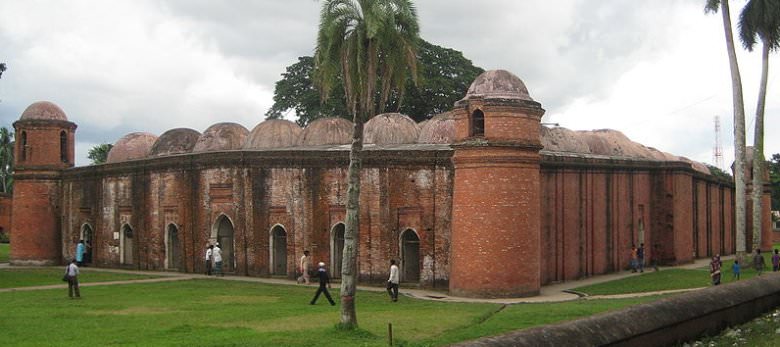
4)     Bagerhat: Accessible from Khulna or Mongla, Bagerhat offers a couple of impressive Mosques and the famous tomb of Khan Jahan Ali. Lots of locals make pilgrimages here daily so expect some organized chaos!
Shat Gambuj Mosque Bagerhat
Shat Gambuj Mosque in Bagerhat
5)     Nafa-Khum:  This one is a bit of a wild card. You’re already off the beaten track by simply being in Bangladesh but if you want to really get away from it all, then this is the place for you. Nafa-Khum is a beautiful waterfall found a 3hours walk from Remakri, which  is found 3 hours by boat from Tindu, which is a 3 hours drive from Thanchi! It may not be the biggest waterfall but it’s awesome none-the-less and you can swim in the pool, the trek is beautiful too and you’ll really feel like you’re traveling if you make it out here!
Nafa-Khum waterfall Bangladesh
Nafa-Khum waterfall
There you go folks, five of Bangladesh’s most awesome sites. This country is not easy to travel in, not by a long shot, but it’s well worth the effort. This is real backpacking! Happy Travels!

How to prevent facebook hacking protect your fb account from hackers

For some people facebook is there life For those who donot want there life destroyed I shall share 15 ways to prevent FB hacking.Please share this post around as this event was seriously traumatic, I’d like to help people prevent it.

What you should not do

  • Same passwords
    I had the same passwords across many accounts. This is a massive error. If you are like me you will sign up for things everyday and who knows what some of these shady affiliate/software companies are doing with your details.
  • Complacent internet habits
    I got really complacent about how I use the internet, which sites I visited and so on. If you use the computer 12 hours a day like me you will probably be doing the same thing.
  • Out of date security and browser versions
    The computers I was using over there had out of date browsers and anti-virus software. My home computer is like Fort Knox now.
  • Incorrect Facebook window settings
    I was visiting Facebook on an insecure page. I didn’t know it either. I’ll show you what I did wrong down below.
So I really do blame myself. I could have possibly avoided this whole mess if I was just a bit more educated and vigilant. Hopefully my experience can serve as a catalyst for you guys to fix up your own security lameness.

Facebook and Email Security tips to stop hackers


Here are some of the very minimum things you should do if you want to stop hackers from ruining your life. The sad thing? You can probably do all of these things perfectly and still get hacked.
  1. Different passwords
    Every single account should have a different password. Never ever have the same password for an insecure site like Facebook and something important like your online banking.
  2. Complex passwords
    If your password is less than ten characters long, a mixture of upper and lower case letters, numbers and symbols then it is not strong enough. It must never be a name, birthday or information about someone or something around you. An example of a strong password is something like “ca#T_on+M
  3. Complex usernames
    I bet 95% of you have your email address or name as your username? Bad move rookie. You should make your usernames as complex as your passwords. Many WordPress blogs are set up with the default username of “admin” so hackers are already 50% of the way there. Change your usernames to something complex and unrelated.
  4. Updated anti-virus and anti-malware software
    You need to have an updated version (or two) of the latest anti-virus and anti-spyware programs. There are free ones like AVG or paid ones like Norton. I also use Malwarebytes (affiliate) to scan for things that anti-virus programs miss. Get one and update it automatically.
  5. Latest Chrome, Firefox, Internet Explorer, Safari versions
    Don’t just ignore that update request from your browser, do it right away. Some of those updates are security ones. In fact, keep up to date as to which is the most secure browser and just use that. Hello Chrome?
  6. Use Facebook and email securely with the right URL
    Go log in to Facebook. Go on, do it. Now, does the URL say “http://” or “https://”? If it is the former then you are not in a secure session. Go in to your settings and make sure it always uses https:// and whenever you log into any website make sure you type the “s” if you are logging in.
  7. Don’t use public free Wi-Fi
    You know when you go to a cafe and log on to the free network? Well, take a look at how easy it is for people to steal your Facebook and email passwords using a simple Firefox plugin. Its really sad that this type of stuff exists. I just don’t use Wi-Fi anymore.
  8. Don’t send passwords or store important information online OR offline
    Don’t send secure information over the net at all. Especially through chat or email. If someone has got into your account without you noticing they might be monitoring what you are doing. If you need to send passwords to workers, family, etc. then call them on the phone. You should also avoid saving passwords on your hard drive as that too is really easy to access.
  9. Make your security questions tough
    You know those security questions like “what is your mother’s maiden name?” Well, make them complex answers. For example, in one of mine I selected first pet’s name and then made the answer a complex password. If you ever get hacked you need this information to re-gain access to the account. You don’t want a hacker to change this.
  10. Back up everything
    You should constantly be backing up your hard drive, emails and blog contents to an external hard drive. If the worst happens and someone deletes your blog content you can get it back up without too much trouble. Imagine if you were relying on a website for your income and it all got deleted?
  11. Don’t use your PC Administrator account
    Most people use the Administrator account because it gives you freedom to add programs, etc. But, did you know that by using a non-Administrator account you can slow down the spread of a virus attack?
  12. Monitor your logged on locations
    If you go down to the bottom of your Gmail account you will see a little line of text that says “Last account activity”. This shows you where your account has been accessed from so if you suspect something is not right you should keep an eye on this and record unfamiliar IPs.
  13. Use a phishing filter
    This can help you identify if anyone is trying to run a phishing scam on you by showing you what is safe.
  14. Don’t click links in emails
    As a general rule, most banks and financial institutions don’t send you emails with links. Don’t ever click any such email you get. If you genuinely think it is from your bank ring them up instead.
  15. Research and read up
    Make sure you are up to date with the latest in internet security. You can create alerts in your news reader or follow blogs that update you on such concerns.
If I have missed anything out please leave a comment and let me know. Hopefully we can turn this article in to a nice resource for people to use in order to prevent these types of hacks and phishing scams happening to them.

What to do if you still get hacked

If you still get hacked there are some important steps that you should take from a business, personal and security point of view.
  • Don’t panic
    I panicked and it made everything so much worse. In the end it turned out to be okay. Even if the worse happens and you lose all your money (which is rare) you can still get back on your feet and fight another day. Most often the bank can investigate such losses and get your money back anyway.
  • Change everything else
    While you are investigating the breach go and change all your other passwords including the security questions on all your other accounts. Make sure you are doing this from a safe PC and a secure network.
  • Email your contacts
    Email your contact list and let them know what has happened and that you are trying to fix it. Apologize for the inconvenience.

How coins are made

Here is a video I found about how collectable coins are made in us mint

youtube link

How to open a password protected locked PC in windows without knowing the password

1.Turn on the computer,
wait till windows asks you for your password
When prompted for a password, type: ctrl+Alt+del
A new screen pops up
In the Username Field type: Administrator
Leave the password field blank.
Press enter
And you are in.
( for education purpose only ) 
 
This only works if you have admin account with no password.
 
2.boot in safe mode press F8 while booting.
go to user accounts n remove password  


3.On windows xp, try this:
Boot computer and press Ctrl+Alt+Delete twice when you See Windows welcome screen / login screen. It'll show classic login box. Now type "Administrator" (without quotes) in username field and leave password field blank, press Enter and you should be able to login Windows.
Now you can reset your account password from "Control Panel -> User Accounts".

If that doesn't or you use windows 7 or vista, try this:
  • Enter a computer that can link to Internet. Download windows password recovery Tool 3.0 and install the software on that computer.
  • Run the software and create windows password reset disk by follow the instructions.
  • Eject the created CD/DVD and insert it into the locked computer.
  • Reboot the locked computer (it's necessary for you to change your locked computer's BIOS setting to make it boot from CD drive) and then follow the instructions to reset your password.
  • Now login Windows and set a new password

Lower Mouse Speed with SlowMousion

If you are more into selecting some shapes using the mouse then it must be more important to you to lower the mouse speed so that you can select the shapes in a better way. Say, you are selecting some area while editing an image then if you do the same with normal speed mouse then chances are you may select some irregular shape.
Although in Windows you can slow down the speed of the mouse movement but this is not what I am conveying about in this post. While slowing the mouse using Windows slows down it completely but with the tool called SlowMousion, you can only slow down when selecting something.
SlowMousion is a small application that slows down mouse cursor’s speed when pressing and holding down a key or button. This allows you more sensitive mouse movements when drawing shapes, dragging something or anything you are doing with mouse.
You can also change the hotkey to be pressed when slowing the mouse motion. The tool is a nice way to put a brake on the mouse speed.

Download slow motion

All kmplayer shortcut keys

  List of shortcut keys
Shortcut
Command

Ctrl+O
Open File(s)

Ctrl+U
Open URL

Ctrl+F
Open Folder

Ctrl+J
Open File(s) for TV-Out

Ctrl+I
Open URL Extracted from IE

Ctrl+R
Open Recent File

Ctrl+P
Reopen after changing settings

Ctrl+M
Open WDM (TV) Device...

Ctrl+W
Open WDM (TV) as Default Device...

Ctrl+D
Open DVD Standard Device

Ctrl+V
Open DVD File

Ctrl+K
Open Video CD

Tab
Playback info (on OSC)

Shft+Tab
Playback Message

Ctrl+Tab
Advanced Playback Info

Ctrl+'
Advanced Filter Info

PgUp
Previous

Space
Play

Ctrl+Z
Stop


PgDn
Next

Alt+G
Control Box

Alt+E
Playlist

M
Mute

5
Fullscreen

Alt+F4
Exit